RTFMv2 Client Features

The RTFMv2 Client is a comprehensive desktop application for penetration testing professionals. From reconnaissance and scanning to AI-assisted reporting, explore every capability designed to streamline your security assessments.

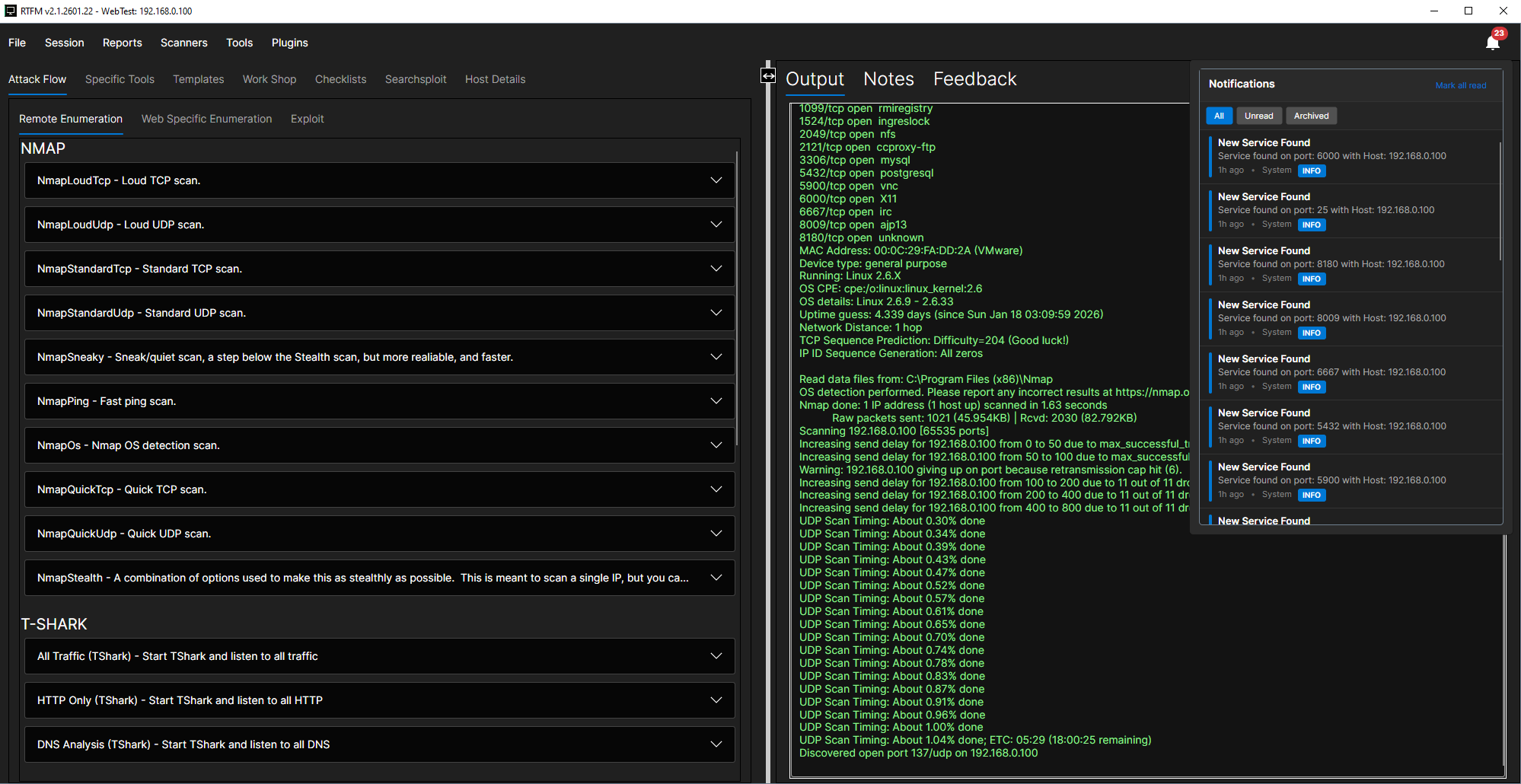
RTFMv2 Client interface preview

Discovery & Assessment

Recon & Scanning Suite

Full-Stack Recon Suite

Comprehensive asset discovery and vulnerability scanning:
  • Nmap integration for port scanning and service detection
  • Nuclei templates for fast vulnerability scanning
  • OpenVAS/GVM for comprehensive vulnerability assessments
  • Ping Scanner for rapid host discovery across subnets

Live Network Monitor

Real-time network visibility and host management:
  • Interface selection for targeted monitoring
  • Live host/service discovery as they appear on the network
  • Add new hosts to scope with one click
  • Network Mapping view for visual topology representation

ZAP Proxy Integration

Web application scanning with full control:
  • Scope controls to limit scanning to target domains
  • Auth options for authenticated scanning
  • Crawler and active scan stages with progress tracking
  • Findings summary and URL details view

Injection & Fuzzing Tools

Specialized testing for common vulnerabilities:
  • Dalfox for XSS vulnerability detection
  • SQLmap for SQL injection testing
  • Wfuzz for high-volume fuzzing and brute forcing

Application Testing

Web & API Security

OpenAPI Endpoint Viewer

Navigate and test APIs with ease:
  • Searchable endpoints with method filters (GET, POST, PUT, DELETE)
  • Per-endpoint details including parameters and schemas
  • Built-in auth modes (API key, bearer, basic) for rapid testing
  • One-click send to Wfuzz or SQLmap for instant testing

API Fuzzing & Testing

Modern API security testing tools:
  • RESTler for stateful REST API fuzzing
  • Schemathesis for property-based API testing
  • ZAP URL details for deep dive request/response inspection

Guided Methodology

Attack Flow & Tooling Hub

Guided Attack Flow

Structured tabs for each pentest phase:
  • Remote Enumeration with Nmap, tshark, tcpdump, DNS, web/SNMP tools
  • Web Enumeration using Nmap, Dirb, Gobuster
  • Exploit tracks with categorized attack paths
  • Templates tab for reusable playbooks and standardized execution
Command Library

Curated commands grouped by category:
  • Categories: enum, vuln scan, exploit, web, stress test, forensics
  • More categories: wireless, sniffing/spoofing, password, maintaining
  • Advanced: reverse shells, reporting, hardware, dynamic analysis

Workshop Hub

Built-in utilities for common pentest tasks:
  • CME runner for CrackMapExec operations
  • CeWL wordlist creator for custom wordlist generation
  • Reverse shell generator with multiple payload types
  • Code snippets library for quick reference

SearchSploit & Host Details

Exploit research and target management:
  • SearchSploit integration with searchable exploit database
  • Exploit detail preview without leaving the app
  • Host Details view with services inventory
  • OS/MAC/subnet fields and host-specific notes

Session Management

Operational Workflow

Session-Centric Workflow

Organize every engagement under one umbrella:
  • New/open/save sessions for easy project management
  • Local or remote sessions with flexible storage options
  • Session settings for target ranges, credentials, and notes
  • Drag-and-drop file uploads with descriptions and progress feedback

Remote Operations

Connect and manage remote infrastructure:
  • Remote session connectivity with host login and session list
  • Remote Consoles manager with WebSocket endpoints
  • Live connection status and channel management
  • SSH Tunnel Manager for operational control

Command Execution

Execution & Data Capture

Command Execution Control

Full control over command execution:
  • Arguments and host targeting for precise execution
  • Parser selection for structured output processing
  • Output file tracking and cancel controls
  • Output, Notes, and Feedback tabs with context actions

Process Logs & Notifications

Track everything that happens:
  • Parser window with drag-and-drop or paste input
  • Process Logs dashboard with console/cancel actions
  • PDF export for process log documentation
  • Notification center with unread badge and quick actions

Documentation

Reporting & Knowledge

Checklist Management

Guided methodology with full documentation:
  • Guided steps with commands, code blocks, and notes
  • Searchable checklist names for fast navigation
  • Supporting detail panels for context and evidence
  • Checklist Report with PDF export for executive summaries

Reports & Visualization

Professional deliverables and insights:
  • Command Report with full output capture and PDF export
  • Mindmap view to visualize scope and relationships
  • Host and findings relationships mapped visually

Intelligent Assistance

AI Assistant

Multi-Provider AI Support

Choose your preferred AI provider:
  • OpenAI integration for cloud-based AI assistance
  • Ollama for local LLM support with full privacy
  • LM Studio for on-premise AI workflows
  • Model selection for default and instruction models per provider

AI Chat & Logging

Contextual assistance with full traceability:
  • Built-in AI Agent/Chat for contextual assistance
  • Connection test and status indicators for each provider
  • Secure API key inputs for safe credential storage
  • AI logs for traceability and auditability

Customization

Extensibility & UX

Plugin System

Extend RTFMv2 with custom functionality:
  • Dynamic discovery and loading of DLL plugins
  • Avalonia plugin support for UI component customization
  • OCR tool for extracting text from screenshots and documents

Modern Desktop UX

Professional-grade interface:
  • Dockable windows for a modular, multi-panel workspace
  • Multi-tab, split-pane UI for rapid context switching
  • Polished Avalonia client for desktop-grade performance