RTFMv2 Console Features

The RTFMv2 Console is a fast, self-contained CLI wrapper for RTFMv2 with rich interactive and scripted operation. From Lua scripting to Node-RED visual automation, discover how the console streamlines your penetration testing workflows.

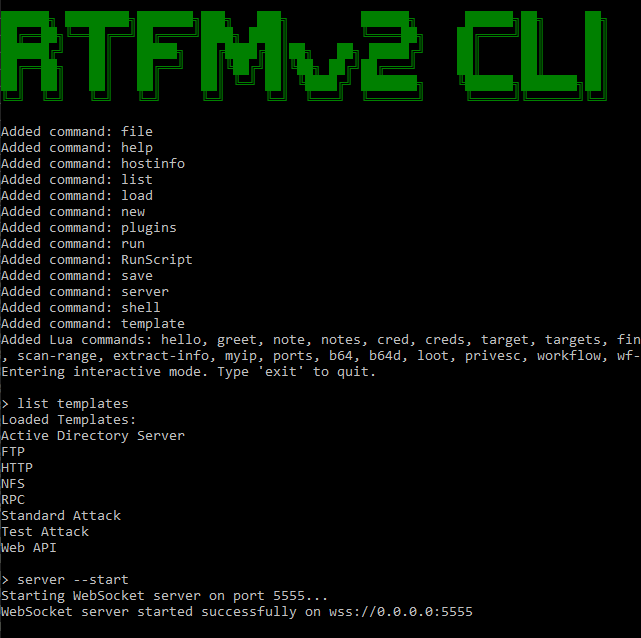
RTFMv2 Client interface preview

Foundation

Core CLI Experience

CLI Architecture

Fast, self-contained command-line interface:
  • Multiple run modes: standard interactive, local Spectre UI, argument mode, Node-RED automation
  • Context-aware command mode turns any command into a scoped "context shell"
  • Built-in command history with cursor navigation and tab completion

Interactive Modes & UX

Rich interactive experience:
  • Classic interactive mode with inline help, context guidance, and suggestions
  • Local Spectre UI mode with command menu, history recall, and styled output
  • Command context guardrails prevent cross-context confusion
  • Built-in help aliases (help / ? / ls) with curated command summary

Project Organization

Session Lifecycle

Session Management

Complete session control from the CLI:
  • Create sessions with name, target host/range, and password prompts
  • Load sessions locally from disk or remotely from an RTFMv2 server
  • Save sessions to disk for offline use
  • Host info lookup to print per-host services within a loaded session

Session Data & Logs

Data persistence for automation:
  • Session data remains available for scripted workflows
  • Plugin access to session context and execution logs
  • List session to display loaded session context and live hosts
  • Remote session sync with RTFMv2 server integration

Execution

Command Execution & Automation

Command Execution

Flexible command execution options:
  • Execute RTFMv2 command library entries by name
  • Execute raw custom OS commands as one-offs (no session history required)
  • Template attack execution with target/port resolution
  • Built-in list capabilities for commands, templates, plugins, connections, Lua

Batch Automation

Script-driven automation:
  • RunScript for multi-line command files (.rtfm2 scripts)
  • Batch automation via scripted command sequences
  • Argument mode for non-interactive scripted execution
  • Template attacks with automated target resolution

Shell Access

Local & Remote Shell Control

Local Shell

Native shell integration:
  • Local shell launcher (cmd, PowerShell, bash, sh) with session tracking
  • Built-in directory change handling (cd) and exit controls
  • Session-aware execution for local commands
  • Cross-platform support for Windows and Linux environments

Remote Shell

WebSocket-based remote execution:
  • Remote shell mode over WebSocket with persisted working directory
  • Execute single remote commands via shell --cmd
  • Per-session working directory persistence
  • Secure WebSocket communication with TLS

Remote Control

WebSocket Server & Remote Control

WSS Server

Built-in secure WebSocket server:
  • Built-in WSS server with TLS certificates auto-generated from license
  • Challenge/response authentication with HMAC proof and nonce validation
  • Session join/leave broadcasting and multi-client session rooms
  • Heartbeat keep-alive responses for client liveness

Connection Management

Full control over remote clients:
  • Live command execution routing for remote clients
  • Start/stop server with connection management
  • Close specific connections or list active clients
  • List connections to view active WebSocket clients

Data Transfer

File Transfer & Loot Handling

File Transfer

Secure file streaming:
  • file --copy streaming from server loot directory to remote clients
  • Chunked transfer with hashes and transfer completion signaling
  • Safe path resolution (absolute or relative to LootDir or shell working directory)
  • Local interactive file browser for quick file selection (Spectre mode)

Operational Introspection

Visibility into your environment:
  • list --commands to view command library by category
  • list --templates to view available template attacks
  • list --connections to view active WebSocket clients
  • list --session to display loaded session context and live hosts

Extensibility

Plugin System & Lua Scripting

DLL Plugin System

Extend with custom plugins:
  • Dynamic plugin loader for external DLLs implementing OptionsBase
  • Plugin commands auto-registered into the CLI
  • Plugin discovery and visibility via list --plugins
  • Full API access to session context and execution

Lua Scripting

Embedded MoonSharp Lua runtime:
  • Hard-sandbox execution for safe script running
  • Auto-load Lua scripts from Plugins/Lua at startup
  • Host API for command registration, options, completions, session access
  • Lua command discovery via list --lua, grouped by script file

Lua Integration

Lua Host API & Lifecycle Hooks

Host API Functions

Full integration capabilities:
  • host:register_command to add custom CLI commands
  • host:register_option to define command options
  • host:add_completion for tab completion support
  • host:session_id, host:get_session_data, host:exec, host:log

Lifecycle Hooks

Advanced automation hooks:
  • init for script initialization
  • on_prompt, on_input_changed for interactive feedback
  • on_before_execute, on_after_execute for command interception
  • on_output, on_error, on_command_invoke, on_complete

Included Plugins

Lua Workflow & Recon Plugins

Workflow Automation

Pre-built workflow automation:
  • Pre-built workflows: initial recon, post-exploit, lateral movement prep
  • Custom workflow creation via wf-create --name --steps
  • Workflow execution and progress reporting
  • Intelligent completions for workflow names and parameters

Recon Helper Plugin

Quick enumeration commands:
  • quick-enum (network/web/SMB/full), scan-range, extract-info
  • Argument parsing helpers and command audit logging
  • Smart completions for common CIDRs and enum types
  • Session-aware context for all recon operations

Notes Plugin

Track findings and credentials:
  • Quick notes, credentials, targets and findings tracking
  • Session-aware context and one-command export view
  • Severity completions for findings
  • Organized data collection throughout engagements

Shortcuts Plugin

Quick reference and utilities:
  • Common port reference for quick lookups
  • Loot location cheatsheet for engagement data
  • Privesc checklist for privilege escalation
  • Base64 encode/decode helpers built-in

Visual Automation

Node-RED Automation Integration

Node-RED Integration

Visual workflow automation:
  • Integrated Node-RED startup mode (nodered) for visual workflow automation
  • Embedded Node-RED package: node-red-contrib-rtfmv2
  • Admin endpoints for live tool metadata (/rtfm-tools-linux, /rtfm-tools-win)
  • WebSocket manager with queueing and reconnect logic

Custom Node-RED Nodes

Purpose-built automation nodes:
  • rtfmv2-linux-command: pick Linux commands from tools.json with dynamic fields
  • rtfmv2-win-command: pick Windows commands from tools_win.json
  • rtfmv2-custom-command: send arbitrary CLI commands with connection test
  • rtfmv2-create-session, rtfmv2-load-session, instruction-payload

Security

Security & Reliability

Security Features

Enterprise-grade security:
  • License-bound startup and TLS key derivation for server mode
  • WSS-only remote server with TLS 1.2/1.3 enforcement
  • Nonce-based auth prevents replay attacks
  • Rate-limit style protection for invalid message types

ASCII Banner & UI

Professional console experience:
  • ASCII splash banner and consistent console UI helpers
  • Styled output in Spectre UI mode
  • Flow outputs for success/error routing to downstream automation
  • Progress reporting for long-running operations