RTFMv2 Server Features

The RTFMv2 Server provides centralized management, team collaboration, and enterprise-grade features for penetration testing teams. From session synchronization to AI-powered reporting, discover how the server enhances your security operations.

RTFMv2 Client interface preview

Deliverables

Findings & Reporting

Finding Management

Full finding lifecycle:
  • Create, edit, delete, export findings with full control
  • Custom finding sections with required/optional toggles
  • Findings export to HTML and PDF formats
  • Convert CVE entries directly into findings

Report Generation

Professional deliverables:
  • Full report editor with executive summary, methodology, narrative
  • Report template library with create/edit/delete actions
  • Template tag replacement for dynamic session-aware content
  • PDF generation via QuestPDF/PdfSharpCore pipelines

Intelligence

AI-Powered Automation

AI Report Generation

Accelerate your documentation:
  • AI-assisted report drafting for findings text generation
  • AI-generated attack narrative from session activity
  • AI-generated conclusion based on findings severity
  • Evidence Bag to Finding AI-powered creation

RAG & Embeddings

Advanced AI workflows:
  • AI provider configuration (OpenAI, Ollama, LM Studio)
  • Embeddings data creator for RAG workflows
  • File ingestion with chunking and embedding generation
  • Similarity ranking with multiple RAG strategies

Research

Knowledge Base & CVE Intelligence

Knowledge Base

Centralized team knowledge:
  • Knowledge Base CRUD with tags and categories
  • Keyword and semantic search (embedding-based)
  • Background embedding generation for KB articles
  • Export results to CSV or JSON formats

CVE Database

Local vulnerability intelligence:
  • Local CVE database with full search UI
  • Filter by CPE, CWE, severity, CVSS, date ranges
  • Background NVD updates with progress tracking
  • CVE to finding conversion with one click

Project Organization

Session Management & Workflow

Session Lifecycle

Complete engagement management:
  • Session creation with host/CIDR parsing, validation, and cleanup
  • Automatic host creation during session setup (IP or hostname)
  • Auto-generated tasks per host when sessions are created
  • Session exports in JSON, CSV, or ZIP formats (full data pack)
Task Board & Collaboration

Team workflow management:
  • Kanban-style task board (New/In Progress/Reporting/Done)
  • Task assignment and status updates per team member
  • Session archival and permanent deletion with admin controls
  • Cross-server session transfer to remote RTFMv2 servers

Integration

Client Sync & API

Comprehensive API

Full sync capabilities for RTFMv2 clients:
  • Auth API for JWT login and token issuance
  • Session listing and per-user session access endpoints
  • File upload/download with metadata management
  • Host/service export APIs for client-side consumption

Full Data Sync

Sync all engagement data:
  • Hosts, services, and notes synchronization
  • Commands and outputs with full history
  • HTTP files, directories, WhatWeb reports
  • User accounts, credentials, SearchSploit results, AI logs

Data Collection

Evidence & File Management

Evidence Bag System

Organize and group your findings:
  • Evidence Bags for grouping commands, files, and notes
  • List views with counts for files, commands, and notes
  • Structured evidence items with metadata
  • Add/remove actions for managing evidence contents

File Repository

Centralized file management:
  • Session file repository with upload, list, download, preview, delete
  • Browser preview for images, PDFs, and text files
  • Large upload support up to 500MB with metadata capture
  • TinyMCE integration for inline image uploads

Host & Service Inventory

Complete asset tracking:
  • Host inventory with OS, MAC, subnet, domain, and status
  • Service inventory grouped by host with port, protocol, version
  • Host notes and user annotations tied to sessions

Content

Data Libraries & Content Management

Checklist & Command Libraries

Reusable content for your team:
  • Checklist editor with categories, steps, commands, code blocks
  • Command library management with categories and export
  • Reverse shell library with create/update workflows
  • Import/export tooling for data creator collections

Mindmap & Data Creators

Shareable content packages:
  • Mindmap downloads for reusable content packages
  • Data creator downloads for team distribution
  • Embeddings export/import for reuse across projects

Operations

Administration & Logging

System Administration

Full operational control:
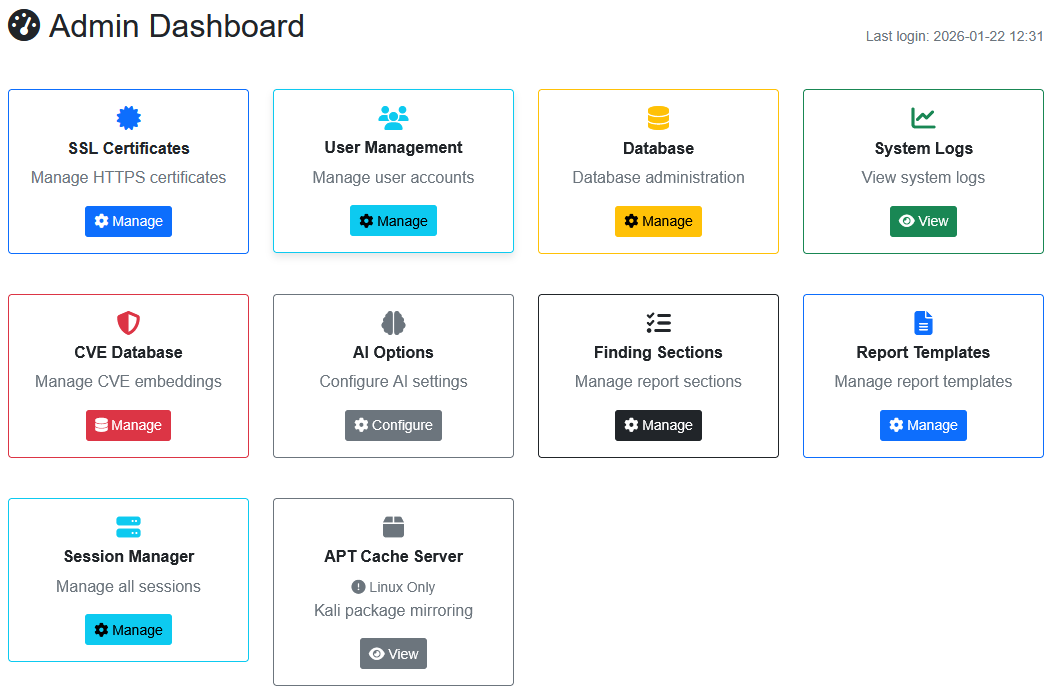
  • Certificate management (create, download, inspect, test)
  • APT cache server for Kali/Linux environments
  • Licensing portal for upload/download license files
  • Client download endpoints for CLI and GUI packages

Logging & Audit

Complete visibility and traceability:
  • System log viewer with severity, category, and time filtering
  • Request logging middleware for full HTTP audit trails
  • Admin log dashboards for events and error counts
  • AI logs captured and stored for traceability

Security

Authentication & Access Control

Multi-Mode Authentication

Flexible authentication for web and API access:
  • Cookie-based authentication for web UI with login/deny redirects
  • JWT authentication for API access with token validation
  • Cookie token support for seamless API integration
  • Centralized login flow with session-aware user/role tracking

Role-Based Access Control

Granular permissions for team management:
  • Role-based authorization for admin-only features
  • Per-session access control via middleware and action filters
  • Admin controls for certificate mgmt, DB mgmt, AI options
  • Session editing with permission assignment to users

Getting Started

Setup & First-Run Experience

Guided Setup Wizard

Get up and running quickly:
  • Initial configuration wizard for admin password and settings
  • Database connectivity verification with masked connection display
  • One-click data population for checklists, commands, reverse shells
  • First-run middleware that enforces setup completion

Database Administration

Full control over your data:
  • Database management dashboard with connection status and health
  • Automated backups with backup history and restore options
  • Password rotation with validation and rollback support
  • Safe database switching with backup + restart flow