
Web UI Agent: A Guided Interface for Automated Web Security Testing
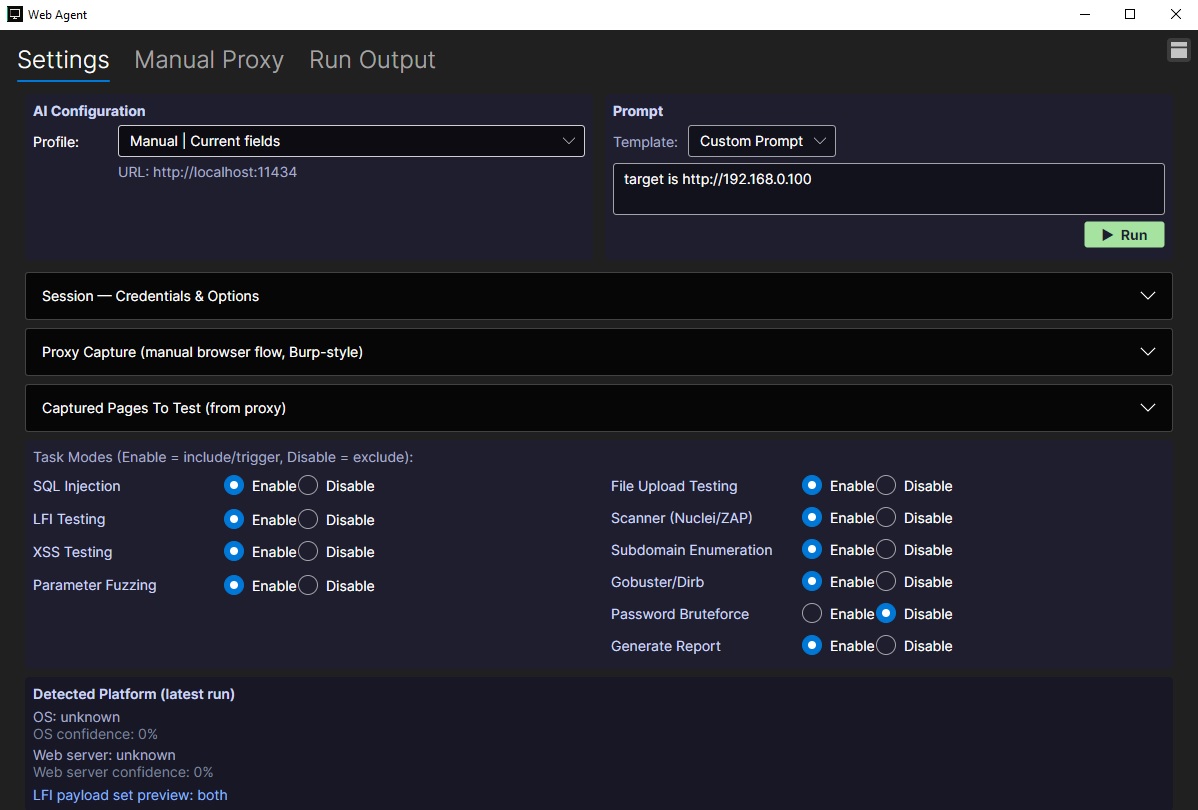
The Web UI Agent is designed to make web application testing more organized, repeatable, and accessible by bringing common security testing workflows into a single graphical interface. Instead of relying entirely on separate command-line tools or manually tracking test settings, users can configure an assessment session, define a target, enable specific testing modules, and review detected platform details from one centralized view.
One of the key features of the Web UI Agent is its AI configuration panel. Users can select a profile, connect to a local AI service, and provide a custom prompt that guides the agent’s behavior during a run. This allows the workflow to be tailored to the specific target or assessment objective while keeping the setup process simple and visible.
The interface also includes session controls for credentials and options, making it easier to manage authenticated testing scenarios when required. For manual exploration, the proxy capture feature supports a browser-driven flow similar to tools like Burp Suite, allowing pages and requests to be captured and later used as test inputs. Captured pages can then be reviewed and included in the testing process.
A major strength of the Web UI Agent is its task mode system. Users can enable or disable specific testing categories such as SQL injection, local file inclusion, cross-site scripting, parameter fuzzing, file upload testing, scanner integration, subdomain enumeration, directory discovery, password brute force testing, and report generation. This modular approach helps keep each run focused and reduces unnecessary noise.
The agent also provides platform detection from the latest run, including operating system and web server confidence values. This gives users quick context about the environment being tested and can help guide follow-up actions. Combined with report generation, the Web UI Agent serves as both a launch point and an organizational layer for web security assessments, helping testers move from setup to execution with less friction.