
Impacket Window: Running the Full Impacket Example Toolkit from One Interface
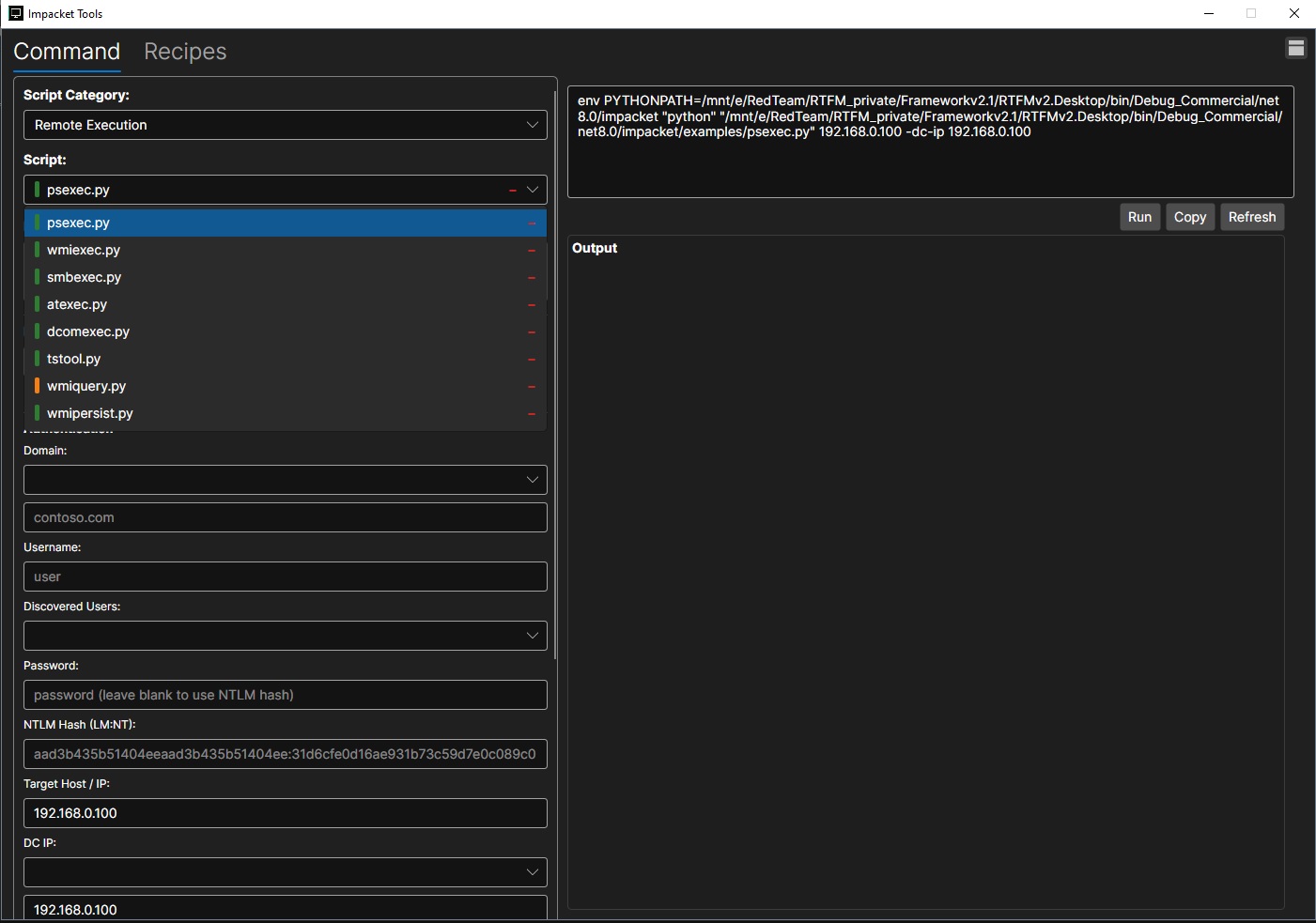
The Impacket window is designed to bring the power of the Impacket example toolkit into a structured graphical workflow. Instead of manually navigating script paths, remembering command formats, or rebuilding long arguments by hand, users can select a script category, choose a specific example script, fill in the required connection details, and generate a ready-to-run command from one place.
A key feature of the window is its support for all 68 Impacket example scripts. This makes the interface useful across a wide range of Active Directory and Windows network assessment tasks, including remote execution, credential use, SMB interaction, Kerberos workflows, registry access, service control, ticket handling, and other common Impacket-driven operations. The category and script selectors help keep the large toolset organized so users can quickly move from a general task type to the exact script they need.
The credential and target fields are built around common Impacket usage patterns. Users can provide a domain, username, password, NTLM hash, target host or IP address, and domain controller IP. This supports both password-based authentication and pass-the-hash style workflows where applicable. Discovered users and related dropdown fields can also help streamline repeated testing once information has been gathered elsewhere in the framework.
On the right side, the command preview shows the exact environment and script invocation that will be executed. This gives users visibility into the generated command before running it and makes it easier to verify target values, authentication material, and script-specific arguments. The Run button executes the selected Impacket script, while Copy allows the command to be reused in a terminal or documentation. Refresh updates the generated command after changes are made.
The output panel provides a dedicated space for script results, keeping command execution and feedback in the same workspace. This allows users to review successful connections, errors, returned data, and script messages without switching contexts. Combined with the Recipes tab, the Impacket window can support both quick execution and guided usage patterns for more specialized workflows.
Overall, the Impacket window turns a large collection of powerful Python examples into a more approachable operational console. By supporting all 68 example scripts and wrapping them with organized categories, reusable connection fields, command preview, execution controls, and output capture, it helps testers use Impacket more consistently during authorized assessments.