
Agent Manager: Viewing, Loading, and Running Framework Agents
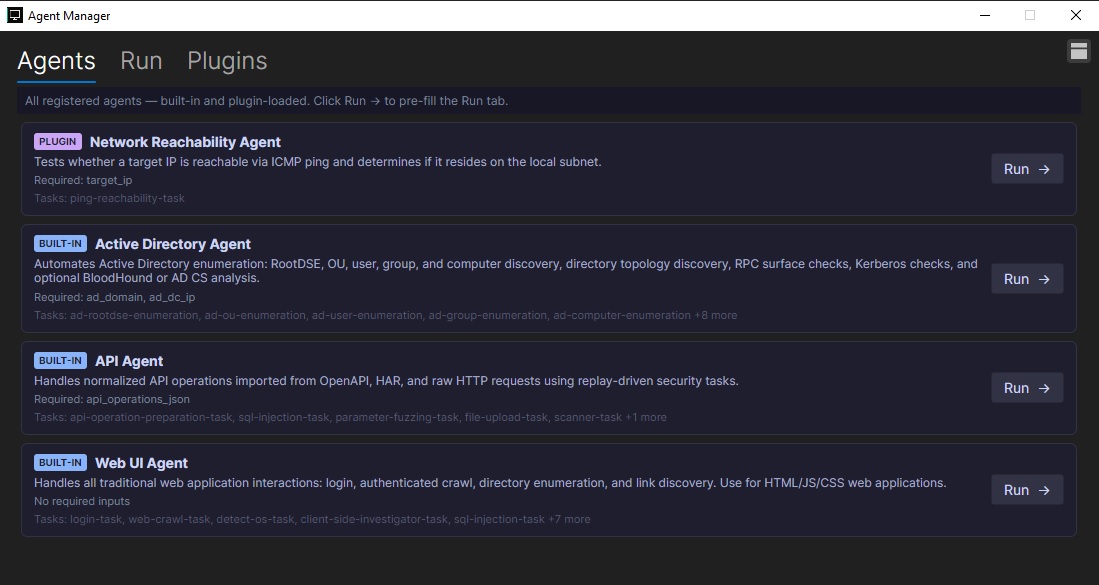
The Agent Manager window is the control center for working with framework agents. It shows all registered agents in one place, including built-in agents and agents loaded through plugins. This gives users a clear inventory of what automation is currently available and makes it easier to choose the right agent for a specific assessment task.
Each agent appears with its source, name, description, required inputs, and supported tasks. Built-in agents such as the Active Directory Agent, API Agent, and Web UI Agent are listed alongside plugin-loaded agents like the Network Reachability Agent. This layout makes it clear which capabilities are native to the framework and which have been added through the plugin system.
The Plugins tab allows users to load additional plugin agents into the framework. Once loaded, those agents appear in the main Agents list with the same structure as built-in agents. This makes the system extensible: new capabilities can be added without changing the core application, while still being managed from the same interface.
Interaction starts from the agent list. Selecting Run on an agent pre-fills the Run tab with the agent’s workflow, required fields, and task configuration. From there, users can provide inputs, execute the agent, and review results. This creates a consistent process for interacting with different kinds of agents, whether they are focused on network reachability, Active Directory enumeration, API testing, or web application automation.
Overall, the Agent Manager helps organize automation across the framework. By showing every loaded agent, supporting plugin-based expansion, and providing a direct path to run and interact with agents, it gives users a practical way to manage both built-in and custom security workflows from one window.