Checklist Manager Brings Structured Workflow Editing to RTFMv2 Server
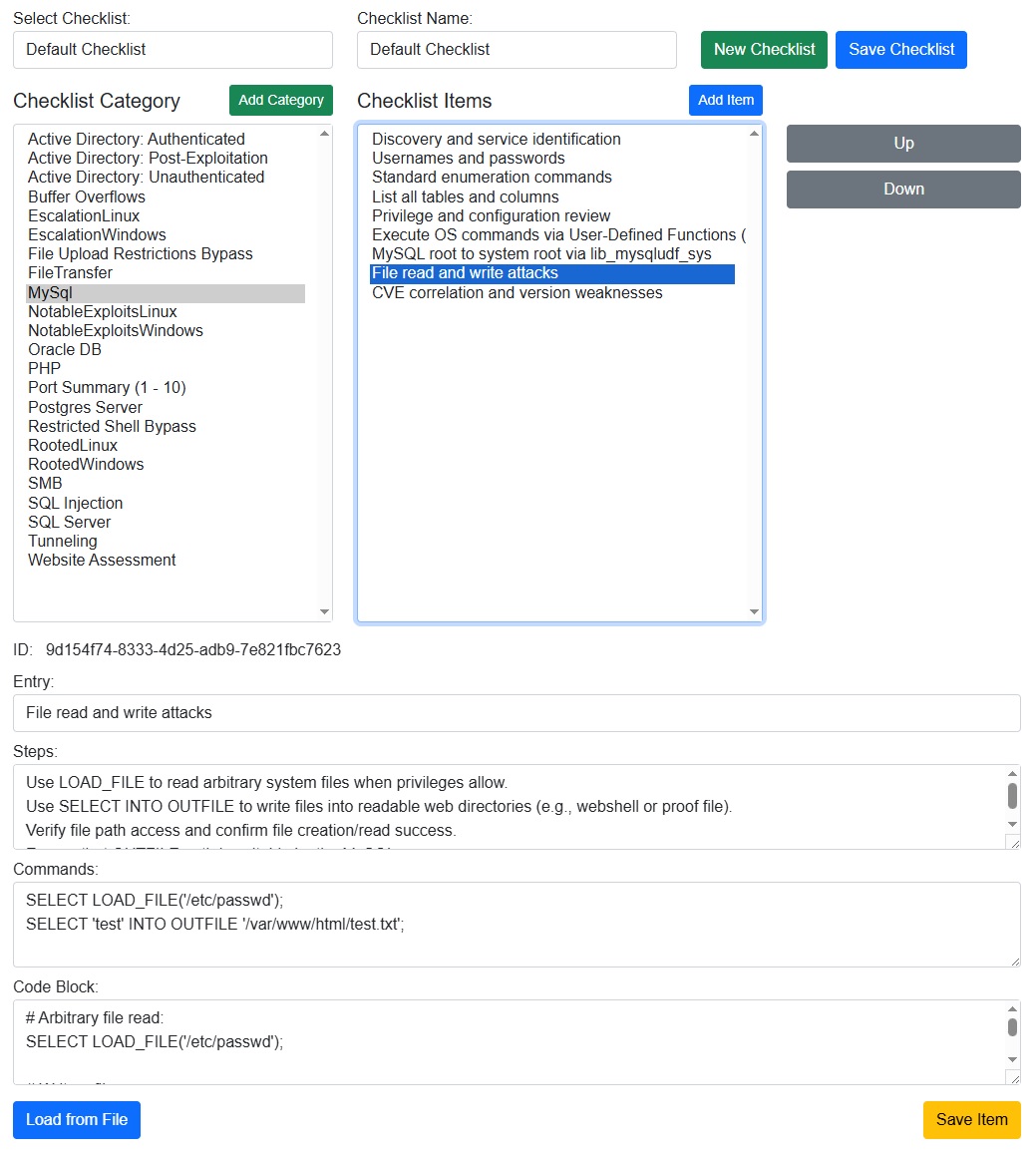
The Checklist Manager page is designed to make checklist creation and maintenance fast and structured. From the top of the view, operators can select an existing checklist, create a new one, or save changes back to the server, keeping the workflow consistent across teams and engagements.
On the left, categories provide the high-level organization of a checklist. Categories can be added on demand, selected for editing, and used to drive the item list shown in the center panel. This makes it easy to keep large, domain-specific checklists grouped by topic or technique.
The center panel focuses on items within a category, with a dedicated list and simple up/down controls to reorder steps as procedures evolve. Selecting an item opens a detailed editor below, where each entry can capture a title, procedural steps, command lines, and a code block, giving teams a single place to store both narrative guidance and executable details.
For portability, the page supports loading checklist data from a JSON file, letting teams import, edit, and then save back to the database without manual re-entry. The overall experience is a practical editor for building repeatable, high-quality checklists inside the RTFMv2 Server admin workflow.