GUI Overview
The CoordOps GUI is the primary desktop client for running and organizing authorized security assessment work. It brings scanner interfaces, tool launchers, Active Directory workflows, AI assistance, parsed results, checklists, notes, and evidence into one session-based operator workspace.
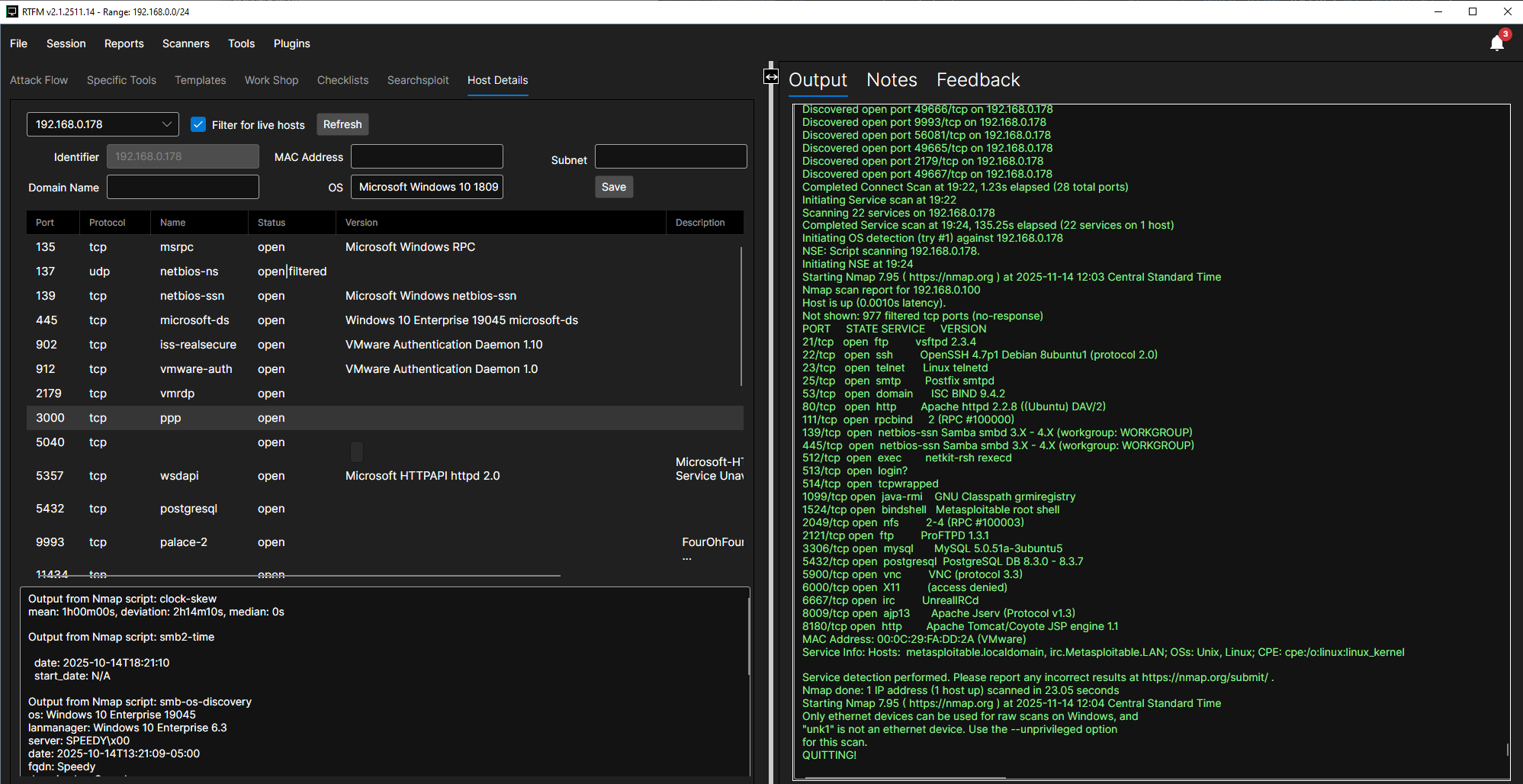
Core Workflow
Most client workflows follow the same pattern:
- Create or open a session.
- Configure the target scope and session settings.
- Run discovery, scanner, or tool workflows.
- Parse output into session data.
- Review hosts, services, findings, evidence, and checklist progress.
- Use AI Chat or an AI agent when you need analysis, test planning, or structured output.
Key Features
Session Workspace
- Local and server-backed sessions: Work offline with local encrypted session files or connect to a CoordOps Server session.
- Session settings: Store target scope, process settings, AI settings, accounts, tool paths, and workflow preferences.
- Reports and logs: Review AI logs, checklist reports, command reports, and saved artifacts from the current engagement.
- Remote consoles and transfer: Connect to remote console sessions and upload or download files when server-backed workflows are in use.
Scanners
- Nmap: Host discovery, port scanning, version detection, OS detection, and NSE-driven workflows.
- Nuclei: Template-based vulnerability checks.
- OpenVAS/GVM: Vulnerability scanning against a GVM server.
- Ping Scanner: Quick reachability checks.
- Web scanners: Dalfox, RESTler, Schemathesis, SQLMap, Web API Viewer, Wfuzz, and ZAP Proxy.
Tools
- AI Agent/Chat: Interactive AI assistant for explaining results, planning tests, and working with session context.
- AI Web Agent: Web UI testing workflow with proxy capture, authenticated browsing support, captured-page selection, and targeted test categories.
- AI API Agent: API testing workflow for OpenAPI, HAR, and raw HTTP imports with selectable tasks for SQLi, fuzzing, file upload, scanning, auth/authz replay, and report generation.
- AI AD Agent: Active Directory enumeration workflow using domain, DC, credential, NTLM hash, or null-session inputs.
- Active Directory tools: LDAP Query, Kerbrute, Impacket Tools, NetExec, BloodHound CE, Certipy, Coercer, Responder, and AD Enumeration Data — see Active Directory Tools.
- General utilities: GoLismero, MSFVenom, Network Map, Network Monitor, OCR, Console, Terminal, Parser, LOLBin Checker, and WinRM.
- Pivoting & tunneling: Chisel, Ligolo-ng, ptunnel, proxytunnel, socat, and SSH Tunnels.
Data Management
- Host details: Track discovered hosts, ports, services, credentials, screenshots, and notes.
- Checklists: Work through repeatable testing steps and preserve progress.
- Mindmaps and graph views: Visualize relationships and attack paths.
- Parsers: Import tool output from common scanners and enumeration tools into structured session data.
Interface Components
| Area | Purpose |
|---|---|
| File menu | Create, open, save, configure, and script sessions |
| Session menu | Sync data, manage processes, accounts, remote consoles, and file transfer |
| Reports menu | Open AI logs, checklist reports, and command reports |
| Scanners menu | Launch network and web/API scanner windows |
| Tools menu | Launch AD, utility, parser, terminal, tunnel, and WinRM windows |
| AI menu | Open the AI chat and the Web, API, and Active Directory agents |
| Help menu | Submit a bug report, open the Script Workbench, view documentation, and check for updates |
| Host/data views | Review session entities, findings, notes, and imported results |
System Requirements
- Operating system: Windows 10/11 or a Debian-based Linux distribution such as Kali
- Runtime: Included with packaged builds unless using a framework-dependent build
- Database: Local SQLite session storage
- Recommended: 8GB RAM or more, sufficient disk space for session data and captured artifacts
- Optional tools: Install the third-party tools you expect to run during an engagement